
はじめに
自宅サーバー(NAS・VPN、実験用途など)を仮想環境で動かしているホストOSであるProxmox VE 8のサポート期限が8/31(作業日当日)なので、最終日ギリギリでサクッとアップグレードする。ガチの本番環境ではなく、ほぼ遊びの環境なので、ガチで運用している人には参考にならないと思う。
(遊びとはいえ、NAS機能はTrueNASを使用したRAIDZ2(RAID6)で組んでいるストレージなので誤って作業してアクセスできなくなると普通に困る)
アップグレードの準備
まず、ゲストOS(ノード)をすべて終了し、バックアップをとる(GUIからできて便利)
次に、これまたGUIから各種パッケージのアップデートをする(apt-get updateとapt-get upgrade)
いよいよ、アップグレード作業に入る
Tera TermからSSHしてコマンドラインで作業します
まず、まず現在のProxmoxのバージョンを確認する
root@pve01:~# pveversion
pve-manager/8.4.21/2606ac850d46da29 (running kernel: 6.8.12-30-pve)
次に、アップグレードできる状態かを確認する
root@pve01:~#  pve8to9
= CHECKING VERSION INFORMATION FOR PVE PACKAGES =

Checking for package updates..
PASS: all packages up-to-date

Checking proxmox-ve package version..
PASS: proxmox-ve package has version >= 8.4-0

Checking running kernel version..
PASS: running kernel '6.8.12-30-pve' is considered suitable for upgrade.

= CHECKING CLUSTER HEALTH/SETTINGS =

SKIP: standalone node.

= CHECKING HYPER-CONVERGED CEPH STATUS =

SKIP: no hyper-converged ceph setup detected!

= CHECKING CONFIGURED STORAGES =

PASS: storage 'NAS-Backup' enabled and active.
PASS: storage 'local' enabled and active.
PASS: storage 'local-lvm' enabled and active.
INFO: Checking storage content type configuration..
PASS: no storage content problems found
PASS: no storage re-uses a directory for multiple content types.
INFO: Check for usage of native GlusterFS storage plugin...
PASS: No GlusterFS storage found.
INFO: Checking whether all external RBD storages have the 'keyring' option configured
SKIP: No RBD storage configured.

= VIRTUAL GUEST CHECKS =

INFO: Checking for running guests..
WARN: 4 running guest(s) detected - consider migrating or stopping them.
INFO: Checking if LXCFS is running with FUSE3 library, if already upgraded..
SKIP: not yet upgraded, no need to check the FUSE library version LXCFS uses
INFO: Checking for VirtIO devices that would change their MTU...
PASS: All guest config descriptions fit in the new limit of 8 KiB
INFO: Checking container configs for deprecated lxc.cgroup entries
PASS: No legacy 'lxc.cgroup' keys found.
INFO: Checking VM configurations for outdated machine versions
PASS: All VM machine versions are recent enough

= MISCELLANEOUS CHECKS =

INFO: Checking common daemon services..
PASS: systemd unit 'pveproxy.service' is in state 'active'
PASS: systemd unit 'pvedaemon.service' is in state 'active'
PASS: systemd unit 'pvescheduler.service' is in state 'active'
PASS: systemd unit 'pvestatd.service' is in state 'active'
INFO: Checking for supported & active NTP service..
WARN: systemd-timesyncd is not the best choice for time-keeping on servers, due to only applying updates on boot.
  While not necessary for the upgrade it's recommended to use one of:
    * chrony (Default in new Proxmox VE installations)
    * ntpsec
    * openntpd

INFO: Checking if the local node's hostname 'pve01' is resolvable..
INFO: Checking if resolved IP is configured on local node..
PASS: Resolved node IP '***.***.***.*' configured and active on single interface.
INFO: Check node certificate's RSA key size
PASS: Certificate 'pve-root-ca.pem' passed Debian Busters (and newer) security level for TLS connections (4096 >= 2048 RSA)
PASS: Certificate 'pve-ssl.pem' passed Debian Busters (and newer) security level for TLS connections (2048 >= 2048 RSA)
INFO: Checking backup retention settings..
PASS: no backup retention problems found.
INFO: checking CIFS credential location..
PASS: no CIFS credentials at outdated location found.
INFO: Checking permission system changes..
INFO: Checking custom role IDs
PASS: no custom roles defined
INFO: Checking node and guest description/note length..
PASS: All node config descriptions fit in the new limit of 64 KiB
INFO: Checking if the suite for the Debian security repository is correct..
PASS: found no suite mismatch
INFO: Checking for existence of NVIDIA vGPU Manager..
PASS: No NVIDIA vGPU Service found.
INFO: Checking bootloader configuration...
WARN: Removable bootloader found at '/boot/efi/EFI/BOOT/BOOTX64.efi', but GRUB packages not set up to update it!
Run the following command:
echo 'grub-efi-amd64 grub2/force_efi_extra_removable boolean true' | debconf-set-selections -v -u
Then reinstall GRUB with 'apt install --reinstall grub-efi-amd64'
FAIL: systemd-boot meta-package installed. This will cause problems on upgrades of other boot-related packages. Remove 'systemd-boot' See https://pve.proxmox.com/wiki/Upgrade_from_8_to_9#sd-boot-warning for more information.
INFO: Check for dkms modules...
SKIP: could not get dkms status
INFO: Check for legacy 'filter' or 'group' sections in /etc/pve/notifications.cfg...
INFO: Check for legacy 'notification-policy' or 'notification-target' options in /etc/pve/jobs.cfg...
PASS: No legacy 'notification-policy' or 'notification-target' options found!
INFO: Check for LVM autoactivation settings on LVM and LVM-thin storages...
NOTICE: storage 'local-lvm' has guest volumes with autoactivation enabled
NOTICE: Starting with PVE 9, autoactivation will be disabled for new LVM/LVM-thin guest volumes. This system has some volumes that still have autoactivation enabled. All volumes with autoactivations reside on local storage, where this normally does not cause any issues.
You can run the following command to disable autoactivation for existing LVM/LVM-thin guest volumes:

        /usr/share/pve-manager/migrations/pve-lvm-disable-autoactivation

INFO: Checking lvm config for thin_check_options...
PASS: Check for correct thin_check_options passed
INFO: Check space requirements for RRD migration...
PASS: Enough free disk space for increased RRD metric granularity requirements, which is roughly 14.00 MiB.
INFO: Checking for IPAM DB files that have not yet been migrated.
PASS: No legacy IPAM DB found.
PASS: No legacy MAC DB found.
INFO: Checking if the legacy sysctl file '/etc/sysctl.conf' needs to be migrated to new '/etc/sysctl.d/' path.
PASS: Legacy file '/etc/sysctl.conf' exists but does not contain any settings.
INFO: Checking if matching CPU microcode package is installed.
WARN: The matching CPU microcode package 'intel-microcode' could not be found! Consider installing it to receive the latest security and bug fixes for your CPU.
        Ensure you enable the 'non-free-firmware' component in the apt sources and run:
        apt install intel-microcode
SKIP: NOTE: Expensive checks, like CT cgroupv2 compat, not performed without '--full' parameter

= SUMMARY =

TOTAL:    44
PASSED:   31
SKIPPED:  6
WARNINGS: 4
FAILURES: 1

ATTENTION: Please check the output for detailed information!
Try to solve the problems one at a time and then run this checklist tool again.
4つのWARNと1つのFAILURESについて1つずつ確認する
1つ目
WARN: 4 running guest(s) detected - consider migrating or stopping them.これは、まだ終了していないノードがあった(NASはアップグレード作業ギリギリまで終了できない)のでシャットダウンすればいいのでOK
2つ目
WARN: systemd-timesyncd is not the best choice for time-keeping on servers, due to only
applying updates on boot.
While not necessary for the upgrade it's recommended to use one of:
* chrony (Default in new Proxmox VE installations)
* ntpsec
* openntpd
これに関しては、時刻同期のパッケージがsystemd-timesncdではなく、chronyを勧めてきているので、chronyに切り替える
root@pve01:~# systemctl status chronyd
Unit chronyd.service could not be found.
chronyのステータスを確認してみたら、見つからないようなので、インストールされていないよう
インストールして設定する
root@pve01:~# apt install chrony
パッケージリストを読み込んでいます... 完了
依存関係ツリーを作成しています... 完了
状態情報を読み取っています... 完了
提案パッケージ:
  networkd-dispatcher
以下のパッケージは「削除」されます:
  systemd-timesyncd
以下のパッケージが新たにインストールされます:
  chrony
アップグレード: 0 個、新規インストール: 1 個、削除: 1 個、保留: 0 個。
289 kB のアーカイブを取得する必要があります。
この操作後に追加で 503 kB のディスク容量が消費されます。
続行しますか? [Y/n] y
取得:1 http://ftp.jp.debian.org/debian bookworm/main amd64 chrony amd64 4.3-2+deb12u3 [289 kB]
289 kB を 0秒 で取得しました (749 kB/s)
(データベースを読み込んでいます ... 現在 71821 個のファイルとディレクトリがイン ストールされています。)
systemd-timesyncd (252.39-1~deb12u2) を削除しています ...
以前に未選択のパッケージ chrony を選択しています。
(データベースを読み込んでいます ... 現在 71808 個のファイルとディレクトリがイン ストールされています。)
.../chrony_4.3-2+deb12u3_amd64.deb を展開する準備をしています ...
chrony (4.3-2+deb12u3) を展開しています...
chrony (4.3-2+deb12u3) を設定しています ...
新バージョンの設定ファイル /etc/network/if-post-down.d/chrony をインストールしています ...
新バージョンの設定ファイル /etc/network/if-up.d/chrony をインストールしています ...
dbus (1.14.10-1~deb12u1) のトリガを処理しています ...
man-db (2.11.2-2) のトリガを処理しています ...
/etc/chrony/chrony.confの最後に、server ntp.jst.mfeed.ad.jp iburstと追加
root@pve01:~# systemctl restart chronyd
root@pve01:~# chronyc tracking
Reference ID    : D2ADA057 (ntp3.jst.mfeed.ad.jp)
Stratum         : 3
Ref time (UTC)  : Mon Aug 31 14:19:14 2026
System time     : 0.000495447 seconds fast of NTP time
Last offset     : +0.000605329 seconds
RMS offset      : 0.000605329 seconds
Frequency       : 6.555 ppm fast
Residual freq   : +10.556 ppm
Skew            : 6.188 ppm
Root delay      : 0.096963778 seconds
Root dispersion : 0.000988138 seconds
Update interval : 1.9 seconds
Leap status     : Normal
再起動して、状態を確認
systemd-timesyncdはインストールする段階で、自動的に削除されたのでこれでOK
3つ目
WARN: Removable bootloader found at '/boot/efi/EFI/BOOT/BOOTX64.efi', but GRUB packages not set up to update it!
Run the following command:
echo 'grub-efi-amd64 grub2/force_efi_extra_removable boolean true' | debconf-set-selections -v -u
Then reinstall GRUB with 'apt install --reinstall grub-efi-amd64'
これは、指示通りbootloaderの設定を変更する
root@pve01:~# echo 'grub-efi-amd64 grub2/force_efi_extra_removable boolean true' | debconf-set-selections -v -u
info: Trying to set 'grub2/force_efi_extra_removable' [boolean] to 'true'
info: Loading answer for 'grub2/force_efi_extra_removable'
root@pve01:~# apt install --reinstall grub-efi-amd64
パッケージリストを読み込んでいます... 完了
依存関係ツリーを作成しています... 完了
状態情報を読み取っています... 完了
アップグレード: 0 個、新規インストール: 0 個、再インストール: 1 個、削除: 0 個、保留: 0 個。
45.7 kB 中 0 B のアーカイブを取得する必要があります。
この操作後に追加で 0 B のディスク容量が消費されます。
パッケージを事前設定しています ...
(データベースを読み込んでいます ... 現在 71843 個のファイルとディレクトリがイン ストールされています。)
.../grub-efi-amd64_2.06-13+pmx7_amd64.deb を展開する準備をしています ...
grub-efi-amd64 (2.06-13+pmx7) で (2.06-13+pmx7 に) 上書き展開しています ...
grub-efi-amd64 (2.06-13+pmx7) を設定しています ...
Installing for x86_64-efi platform.
File descriptor 3 (pipe:[280044]) leaked on vgs invocation. Parent PID 93817: grub-install.real
File descriptor 3 (pipe:[280044]) leaked on vgs invocation. Parent PID 93817: grub-install.real
Installation finished. No error reported.
Generating grub configuration file ...
Found linux image: /boot/vmlinuz-6.8.12-43-pve
Found initrd image: /boot/initrd.img-6.8.12-43-pve
Found linux image: /boot/vmlinuz-6.8.12-30-pve
Found initrd image: /boot/initrd.img-6.8.12-30-pve
Found linux image: /boot/vmlinuz-6.5.13-6-pve
Found initrd image: /boot/initrd.img-6.5.13-6-pve
Found linux image: /boot/vmlinuz-6.5.11-4-pve
Found initrd image: /boot/initrd.img-6.5.11-4-pve
Found memtest86+ 64bit EFI image: /boot/memtest86+x64.efi
Adding boot menu entry for UEFI Firmware Settings ...
done
shim-signed:amd64 (1.51+pmx1~bpo12+1+16.1-2+pmx1~bpo12+1) のトリガを処理しています ...
4つ目
WARN: The matching CPU microcode package 'intel-microcode' could not be found! Consider installing it to receive the latest security and bug fixes for your CPU.
Ensure you enable the 'non-free-firmware' component in the apt sources and run:
apt install intel-microcode
intel-microcodeを入れた方がいいらしいので、sources.listにnon-free-firmwareを追記して、インストールする
vim /etc/apt/sources.list

-deb http://ftp.jp.debian.org/debian bookworm main contrib
+deb http://ftp.jp.debian.org/debian bookworm main contrib non-free-firmware

-deb http://ftp.jp.debian.org/debian bookworm-updates main contrib
+deb http://ftp.jp.debian.org/debian bookworm-updates main contrib non-free-firmware

-deb http://security.debian.org bookworm-security main contrib
+deb http://security.debian.org bookworm-security main contrib non-free-firmware

root@pve01:~# apt update
ヒット:1 http://security.debian.org bookworm-security InRelease
ヒット:2 http://ftp.jp.debian.org/debian bookworm InRelease
取得:3 http://security.debian.org bookworm-security/non-free-firmware amd64 Packages [940 B]
ヒット:4 http://ftp.jp.debian.org/debian bookworm-updates InRelease
取得:5 http://security.debian.org bookworm-security/non-free-firmware Translation-en [648 B]
取得:6 http://ftp.jp.debian.org/debian bookworm/non-free-firmware amd64 Packages [6,368 B]
取得:7 http://ftp.jp.debian.org/debian bookworm/non-free-firmware Translation-en [20.9 kB]
ヒット:8 http://download.proxmox.com/debian/pve bookworm InRelease
28.9 kB を 2秒 で取得しました (13.8 kB/s)
パッケージリストを読み込んでいます... 完了
依存関係ツリーを作成しています... 完了
状態情報を読み取っています... 完了
パッケージはすべて最新です。
root@pve01:~# apt install intel-microcode
パッケージリストを読み込んでいます... 完了
依存関係ツリーを作成しています... 完了
状態情報を読み取っています... 完了
以下の追加パッケージがインストールされます:
  iucode-tool
以下のパッケージが新たにインストールされます:
  intel-microcode iucode-tool
アップグレード: 0 個、新規インストール: 2 個、削除: 0 個、保留: 0 個。
12.9 MB のアーカイブを取得する必要があります。
この操作後に追加で 21.5 MB のディスク容量が消費されます。
続行しますか? [Y/n] y
取得:1 http://ftp.jp.debian.org/debian bookworm/main amd64 iucode-tool amd64 2.3.1-3 [56.1 kB]
取得:2 http://ftp.jp.debian.org/debian bookworm/non-free-firmware amd64 intel-microcode amd64 3.20251111.1~deb12u1 [12.8 MB]
12.9 MB を 1秒 で取得しました (17.7 MB/s)
以前に未選択のパッケージ iucode-tool を選択しています。
(データベースを読み込んでいます ... 現在 71843 個のファイルとディレクトリがイン ストールされています。)
.../iucode-tool_2.3.1-3_amd64.deb を展開する準備をしています ...
iucode-tool (2.3.1-3) を展開しています...
以前に未選択のパッケージ intel-microcode を選択しています。
.../intel-microcode_3.20251111.1~deb12u1_amd64.deb を展開する準備をしています ...
intel-microcode (3.20251111.1~deb12u1) を展開しています...
iucode-tool (2.3.1-3) を設定しています ...
intel-microcode (3.20251111.1~deb12u1) を設定しています ...
intel-microcode: microcode will be updated at next boot
man-db (2.11.2-2) のトリガを処理しています ...
initramfs-tools (0.142+deb12u3) のトリガを処理しています ...
update-initramfs: Generating /boot/initrd.img-6.8.12-43-pve
Running hook script 'zz-proxmox-boot'..
Re-executing '/etc/kernel/postinst.d/zz-proxmox-boot' in new private mount namespace..
No /etc/kernel/proxmox-boot-uuids found, skipping ESP sync.
1つのFAIL
FAIL: systemd-boot meta-package installed. This will cause problems on upgrades of other boot-related packages. Remove 'systemd-boot' See https://pve.proxmox.com/wiki/Upgrade_from_8_to_9#sd-boot-warning for more information.GRUBを使用している場合、systemd-bootは削除した方がいいとのこと
root@pve01:~# efibootmgr -vこれで、grubx64.efi、shimx64.efiなどを使用、つまりGRUBを使用していることを確認し、削除する
root@pve01:~# apt remove systemd-boot
パッケージリストを読み込んでいます... 完了
依存関係ツリーを作成しています... 完了
状態情報を読み取っています... 完了
以下のパッケージは「削除」されます:
  systemd-boot
アップグレード: 0 個、新規インストール: 0 個、削除: 1 個、保留: 0 個。
この操作後に 251 kB のディスク容量が解放されます。
続行しますか? [Y/n] y
(データベースを読み込んでいます ... 現在 71992 個のファイルとディレクトリがイン ストールされています。)
systemd-boot (252.39-1~deb12u2) を削除しています ...
man-db (2.11.2-2) のトリガを処理しています ...
マイクロコードのインストールなど行ったのでホストOSごと念のため再起動
これでWARNとFAILが消えたかもう一度確認
root@pve01:~# pve8to9
= CHECKING VERSION INFORMATION FOR PVE PACKAGES =

Checking for package updates..
PASS: all packages up-to-date

Checking proxmox-ve package version..
PASS: proxmox-ve package has version >= 8.4-0

Checking running kernel version..
PASS: running kernel '6.8.12-43-pve' is considered suitable for upgrade.

= CHECKING CLUSTER HEALTH/SETTINGS =

SKIP: standalone node.

= CHECKING HYPER-CONVERGED CEPH STATUS =

SKIP: no hyper-converged ceph setup detected!

= CHECKING CONFIGURED STORAGES =

storage 'NAS-Backup' is not online
WARN: storage 'NAS-Backup' enabled but not active!
PASS: storage 'local' enabled and active.
PASS: storage 'local-lvm' enabled and active.
INFO: Checking storage content type configuration..
PASS: no storage content problems found
WARN: activating 'NAS-Backup' failed - storage 'NAS-Backup' is not online

PASS: no storage re-uses a directory for multiple content types.
storage 'NAS-Backup' is not online
INFO: Check for usage of native GlusterFS storage plugin...
PASS: No GlusterFS storage found.
INFO: Checking whether all external RBD storages have the 'keyring' option configured
SKIP: No RBD storage configured.

= VIRTUAL GUEST CHECKS =

INFO: Checking for running guests..
PASS: no running guest detected.
INFO: Checking if LXCFS is running with FUSE3 library, if already upgraded..
SKIP: not yet upgraded, no need to check the FUSE library version LXCFS uses
INFO: Checking for VirtIO devices that would change their MTU...
PASS: All guest config descriptions fit in the new limit of 8 KiB
INFO: Checking container configs for deprecated lxc.cgroup entries
PASS: No legacy 'lxc.cgroup' keys found.
INFO: Checking VM configurations for outdated machine versions
PASS: All VM machine versions are recent enough

= MISCELLANEOUS CHECKS =

INFO: Checking common daemon services..
PASS: systemd unit 'pveproxy.service' is in state 'active'
PASS: systemd unit 'pvedaemon.service' is in state 'active'
PASS: systemd unit 'pvescheduler.service' is in state 'active'
PASS: systemd unit 'pvestatd.service' is in state 'active'
INFO: Checking for supported & active NTP service..
PASS: Detected active time synchronisation unit 'chrony.service'
INFO: Checking if the local node's hostname 'pve01' is resolvable..
INFO: Checking if resolved IP is configured on local node..
PASS: Resolved node IP '***.***.***.*' configured and active on single interface.
INFO: Check node certificate's RSA key size
PASS: Certificate 'pve-root-ca.pem' passed Debian Busters (and newer) security level for TLS connections (4096 >= 2048 RSA)
PASS: Certificate 'pve-ssl.pem' passed Debian Busters (and newer) security level for TLS connections (2048 >= 2048 RSA)
INFO: Checking backup retention settings..
PASS: no backup retention problems found.
INFO: checking CIFS credential location..
PASS: no CIFS credentials at outdated location found.
INFO: Checking permission system changes..
INFO: Checking custom role IDs
PASS: no custom roles defined
INFO: Checking node and guest description/note length..
PASS: All node config descriptions fit in the new limit of 64 KiB
INFO: Checking if the suite for the Debian security repository is correct..
PASS: found no suite mismatch
INFO: Checking for existence of NVIDIA vGPU Manager..
PASS: No NVIDIA vGPU Service found.
INFO: Checking bootloader configuration...
PASS: bootloader packages installed correctly
INFO: Check for dkms modules...
SKIP: could not get dkms status
INFO: Check for legacy 'filter' or 'group' sections in /etc/pve/notifications.cfg...
INFO: Check for legacy 'notification-policy' or 'notification-target' options in /etc/pve/jobs.cfg...
PASS: No legacy 'notification-policy' or 'notification-target' options found!
storage 'NAS-Backup' is not online
INFO: Check for LVM autoactivation settings on LVM and LVM-thin storages...
NOTICE: storage 'local-lvm' has guest volumes with autoactivation enabled
NOTICE: Starting with PVE 9, autoactivation will be disabled for new LVM/LVM-thin guest volumes. This system has some volumes that still have autoactivation enabled. All volumes with autoactivations reside on local storage, where this normally does not cause any issues.
You can run the following command to disable autoactivation for existing LVM/LVM-thin guest volumes:

        /usr/share/pve-manager/migrations/pve-lvm-disable-autoactivation

INFO: Checking lvm config for thin_check_options...
PASS: Check for correct thin_check_options passed
INFO: Check space requirements for RRD migration...
PASS: Enough free disk space for increased RRD metric granularity requirements, which is roughly 14.00 MiB.
INFO: Checking for IPAM DB files that have not yet been migrated.
PASS: No legacy IPAM DB found.
PASS: No legacy MAC DB found.
INFO: Checking if the legacy sysctl file '/etc/sysctl.conf' needs to be migrated to new '/etc/sysctl.d/' path.
PASS: Legacy file '/etc/sysctl.conf' exists but does not contain any settings.
INFO: Checking if matching CPU microcode package is installed.
PASS: Found matching CPU microcode package 'intel-microcode' installed.
SKIP: NOTE: Expensive checks, like CT cgroupv2 compat, not performed without '--full' parameter

= SUMMARY =

TOTAL:    44
PASSED:   34
SKIPPED:  6
WARNINGS: 2
FAILURES: 0

ATTENTION: Please check the output for detailed information!
新たにWARNが出てますが、NASをシャットダウンしたことによるものなので大丈夫
アップグレードの実行
参照先のリポジトリを変える
root@pve01:~# sed -i 's/bookworm/trixie/g' /etc/apt/sources.list
root@pve01:~# sed -i 's/bookworm/trixie/g' /etc/apt/sources.list.d/pve-enterprise.list
root@pve01:~# cat > /etc/apt/sources.list.d/pve-enterprise.sources << EOF
Types: deb
URIs: https://enterprise.proxmox.com/debian/pve
Suites: trixie
Components: pve-enterprise
Signed-By: /usr/share/keyrings/proxmox-archive-keyring.gpg
EOF
root@pve01:~# cat > /etc/apt/sources.list.d/proxmox.sources << EOF
Types: deb
URIs: http://download.proxmox.com/debian/pve
Suites: trixie
Components: pve-no-subscription
Signed-By: /usr/share/keyrings/proxmox-archive-keyring.gpg
EOF
subscriptionはないので、GUIから無効にしておく
いよいよ実際にアップグレードする
root@pve01:~# apt update
ヒット:1 http://security.debian.org trixie-security InRelease
ヒット:2 http://ftp.jp.debian.org/debian trixie InRelease
ヒット:3 http://ftp.jp.debian.org/debian trixie-updates InRelease
取得:4 http://download.proxmox.com/debian/pve trixie InRelease [4,357 B]
4,357 B を 2秒 で取得しました (2,356 B/s)
パッケージリストを読み込んでいます... 完了
依存関係ツリーを作成しています... 完了
状態情報を読み取っています... 完了
アップグレードできるパッケージが 594 個あります。表示するには 'apt list --upgradable' を実行してください。
root@pve01:~# apt dist-upgrade
(長いので略)
途中で出るchangelogはqキーを押せば次に進める(なぜか操作の説明の部分が文字化けしていた)
設定ファイル '/etc/issue'
 ==> これはインストールしてから (あなたかスクリプトによって) 変更されています。
 ==> パッケージ配布元が更新版を提供しています。
   どうしますか? 以下の選択肢があります:
    Y か I  : パッケージメンテナのバージョンをインストールする
    N か O  : 現在インストールされている自分のバージョンを残す
      D     : 両バージョンの差異を表示する
      Z     : 状況を調査するためにシェルを開始する
 デフォルトでは現在使っている自分のバージョンを残します。
*** issue (Y/I/N/O/D/Z) [デフォルト=N] ?
これはNを選択
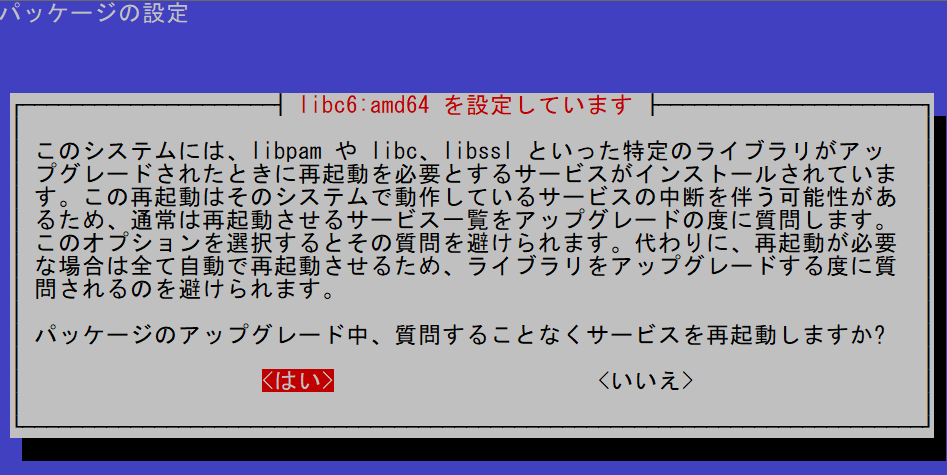
これはいちいち再起動と聞かれると面倒なので<はい>を選択
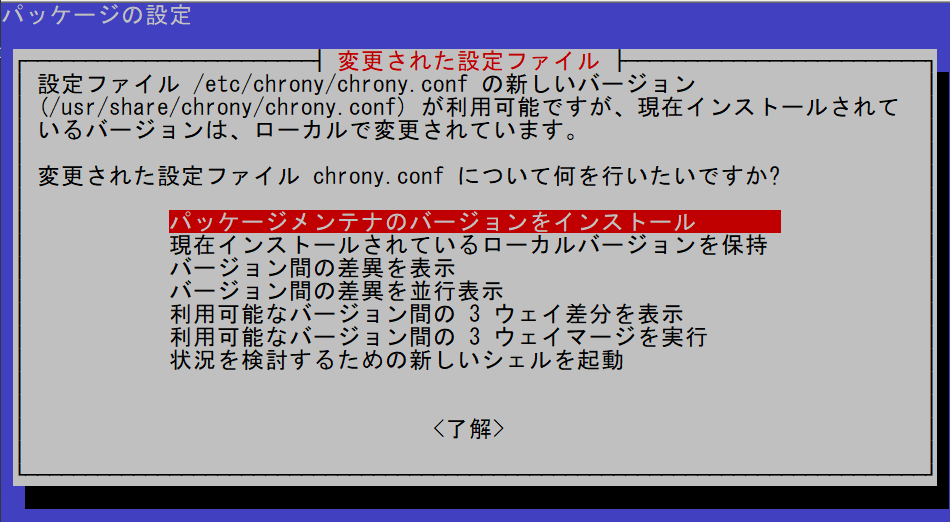
先ほど変えたchrony.confについて聞かれたので、とりあえず最新のを入れて後から編集した分追記すればいいので一番上を選択
設定ファイル '/etc/lvm/lvm.conf'
 ==> これはインストールしてから (あなたかスクリプトによって) 変更されています。
 ==> パッケージ配布元が更新版を提供しています。
   どうしますか? 以下の選択肢があります:
    Y か I  : パッケージメンテナのバージョンをインストールする
    N か O  : 現在インストールされている自分のバージョンを残す
      D     : 両バージョンの差異を表示する
      Z     : 状況を調査するためにシェルを開始する
 デフォルトでは現在使っている自分のバージョンを残します。
*** lvm.conf (Y/I/N/O/D/Z) [デフォルト=N] ?
これはYを選択
設定ファイル '/etc/apt/sources.list.d/pve-enterprise.sources'
 ==> あなたかスクリプトによって設定ファイルが作成されています。
 ==> パッケージメンテナが提供するパッケージにもこのファイルが存在します。
   どうしますか? 以下の選択肢があります:
    Y か I  : パッケージメンテナのバージョンをインストールする
    N か O  : 現在インストールされている自分のバージョンを残す
      D     : 両バージョンの差異を表示する
      Z     : 状況を調査するためにシェルを開始する
 デフォルトでは現在使っている自分のバージョンを残します。
*** pve-enterprise.sources (Y/I/N/O/D/Z) [デフォルト=N] ?
これもYを選択
最後まで終わったらrebootで再起動する
root@pve01:~# reboot再起動後、バージョンを確認したところ、問題なく更新されていた
root@pve01:~# pveversion
pve-manager/9.2.11/f6997e698c7933ea (running kernel: 7.0.14-14-pve)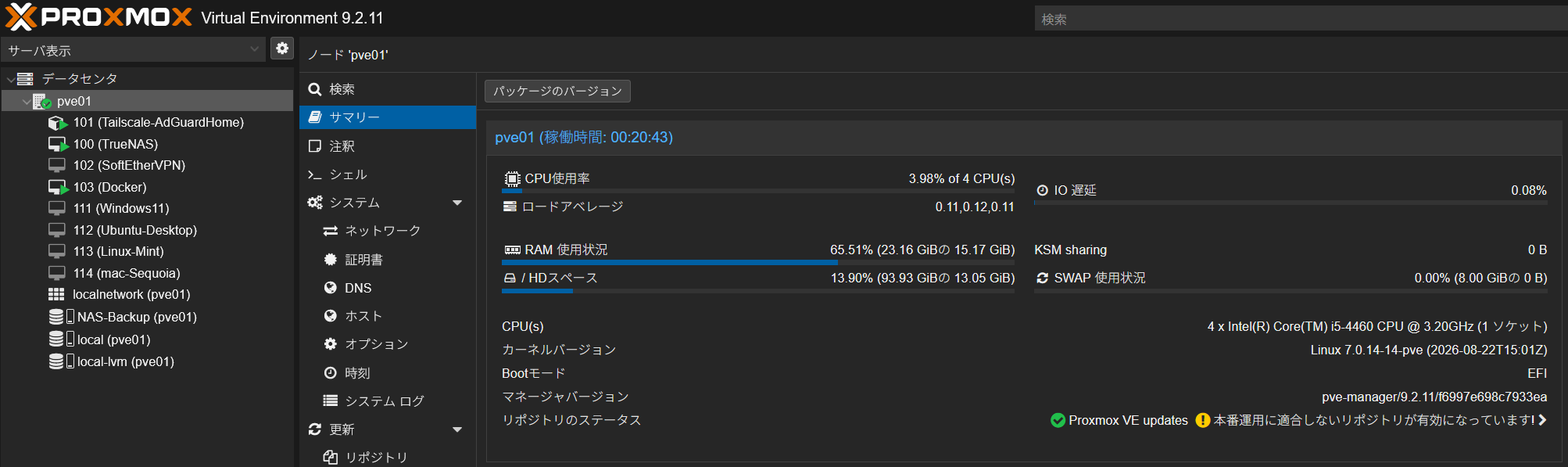
chronyの設定はもう一度追記した
参考
あとがき
アップグレード後にホストOSのドライブがRead-Onlyになり、WebUIにアクセスできないどころか、SSHでもホストOSの操作をほぼ受け付けない症状(VMは普通に動作している)が発生して、rebootで再起動しても改善せず
ログを見るとIO関連のエラーだったのでもしやSSDの故障かと思ったが、電源ケーブル完全に抜く再起動を行ったところ再発していないため、バックアップをとった上で様子見することにする
あと、アップグレードはサポート終了ギリギリではなく、早めにやったほうがいい(当たり前)
